How to Use Xiaohongshu (RedNote) for China Travel: Search Like a Local Without Falling for the Hype
⚡ Quick answer: Xiaohongshu (RedNote) is optional for trip basics — visas, hotels, trains, opening hours, and navigation live better in Trip.com and Amap. It is high-value for local discovery — food, cafés, photo spots, citywalk routes, niche experiences you will not find in English guidebooks. The operational trick is not "how do I sign up." It is a four-step loop: search in Chinese, read with in-app translation or Ask dots, verify the place, then hand the Chinese name off to Amap.
Most "how to use RedNote" articles are registration walkthroughs. That is not the problem foreign travelers have in 2026 — international accounts, English UI, and full-post translation all work. What still breaks is the layer between inspiration and execution: finding the local recommendation, then confirming it is real, current, and reachable. This guide is that workflow.
Chinese place name + intent modifier
Type the Chinese name of the place plus what you actually want — 讲解 (guided walk), 路线 (route), 避雷 (red flags), 咖啡馆推荐 (café recs). English queries return a mix of English and Chinese posts; the Chinese starting suggestions are more operational.
Full translation or Ask dots
Turn on automatic translation to read the whole post (title, body, location tag, comments) in English. Or use the Share → Ask dots action to send a post into Xiaohongshu's AI assistant and get an English summary. Both are for reading. Neither creates a route, resolves the map entity, or verifies a single fact.
Preserve the Chinese name → Amap
Copy the Chinese name from the location tag (not the translated one). Paste it into Amap. Confirm the entity exists, matches the photos, and is currently open. That handoff is manual — there is no one-tap Xiaohongshu → Amap export.
Below: what RedNote replaces in your toolkit, the two-feed problem, the two reading layers, the note-to-Amap handoff, the trust filter, and the privacy/checklist tail.
What RedNote is actually good for — and what Trip.com and Amap still own
RedNote (小红书 / Xiaohongshu) is a lifestyle-and-recommendation platform — not a booking platform, not a maps platform. Treating it as either is how you end up planning a half-day around a filtered photo of a place that closed.
Use RedNote for: restaurants, cafés, bars, dessert shops; photo spots and seasonal views; citywalk routes and neighborhood recs; niche shops, workshops, and locally trending experiences — where tourist-facing English media is thin.
Do not use RedNote as your primary source for: hotels (Hotels That Accept Foreign Passports); train tickets (Train Tickets for Foreigners); official attraction ticketing (Attraction Tickets in China 2026); opening hours, entry rules, or transit info; visa policy or anything with a legal deadline.
The traveler adoption pattern is clear on the good use case:
"Rednote App - used that to find out where all the foodies eat"
— r/chinatravel · Just got back from China and sharing a few tips as a person who worries · Apr 2026 · 👍~191 🔗 Original thread
For where XHS sits inside the wider foreigner-in-China app stack, see Essential Apps for China 2026.
English search vs Chinese search — the two-feed problem
The most useful thing to know about RedNote is that query language shapes results — but not the way many guides claim. English search does not show "only foreign users." Search "forbidden city" and the grid still returns a mix of English and Chinese post titles. What changes is the starting suggestions and the operational depth of the content mix.
Inspiration-flavored, mixed content
Type forbidden city and the dropdown offers concatenated-token suggestions like forbiddencity北京, forbiddencitybook, forbiddencity电影. The results grid mixes English posts ("The Forbidden City, Beijing") with Chinese posts on the same subject. Fine for inspiration; weaker for planning specifics.
Operational, planning-flavored
Type 故宫 and the dropdown offers 故宫讲解 (guided explanation), 故宫门票预约 (ticket reservation), 故宫游玩路线攻略 (route strategy), 故宫入口最佳路线 (best entrance), 故宫平面图 (floor plan), 故宫导游 (guide). What a domestic visitor would search on the morning of a visit — and the underlying content is deeper.
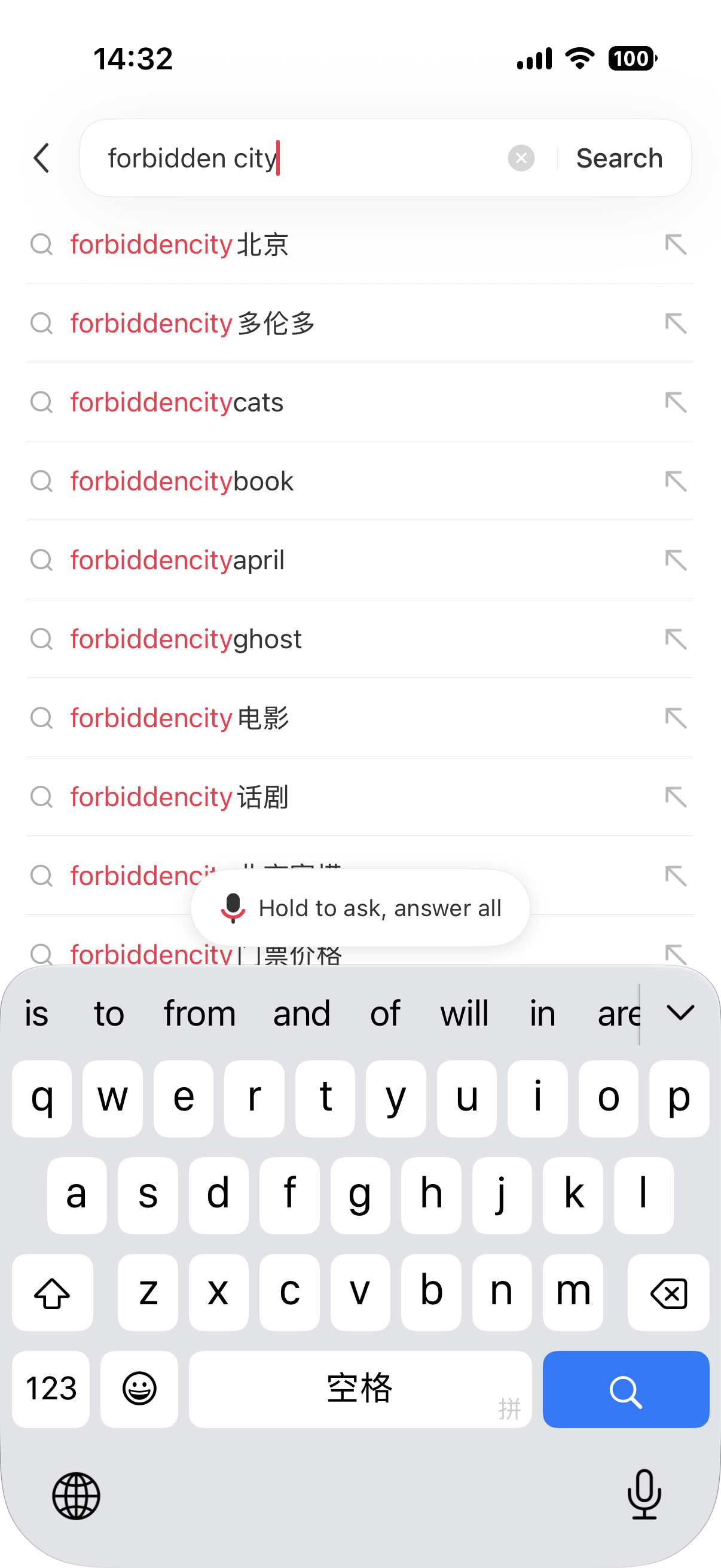
English forbidden city — the dropdown collapses into concatenated-token suggestions. Fine for inspiration, thin on planning-specific intent.
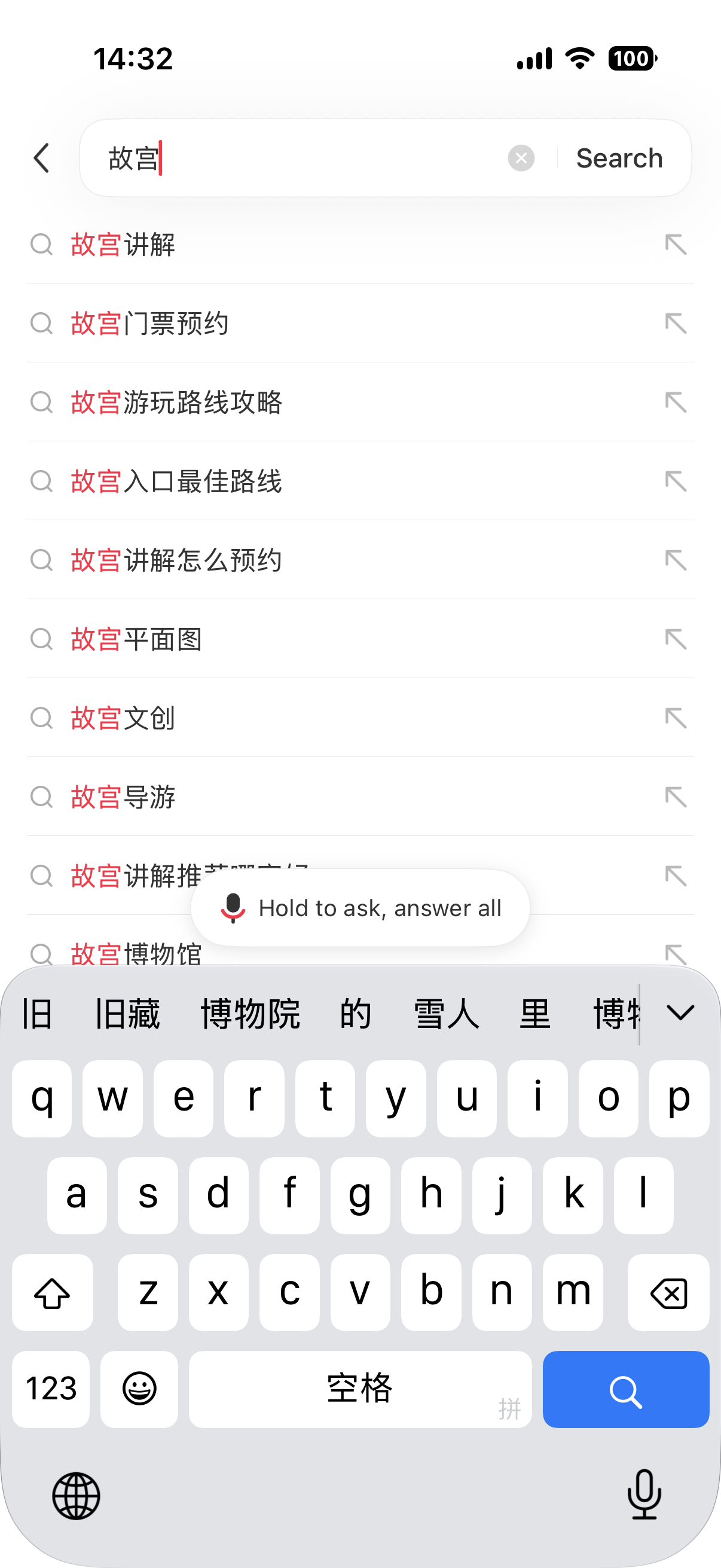
Chinese 故宫 — the same query in Chinese surfaces what a domestic visitor would actually search: guided-explanation posts, ticket reservation, route strategy, best entrance, floor plan.
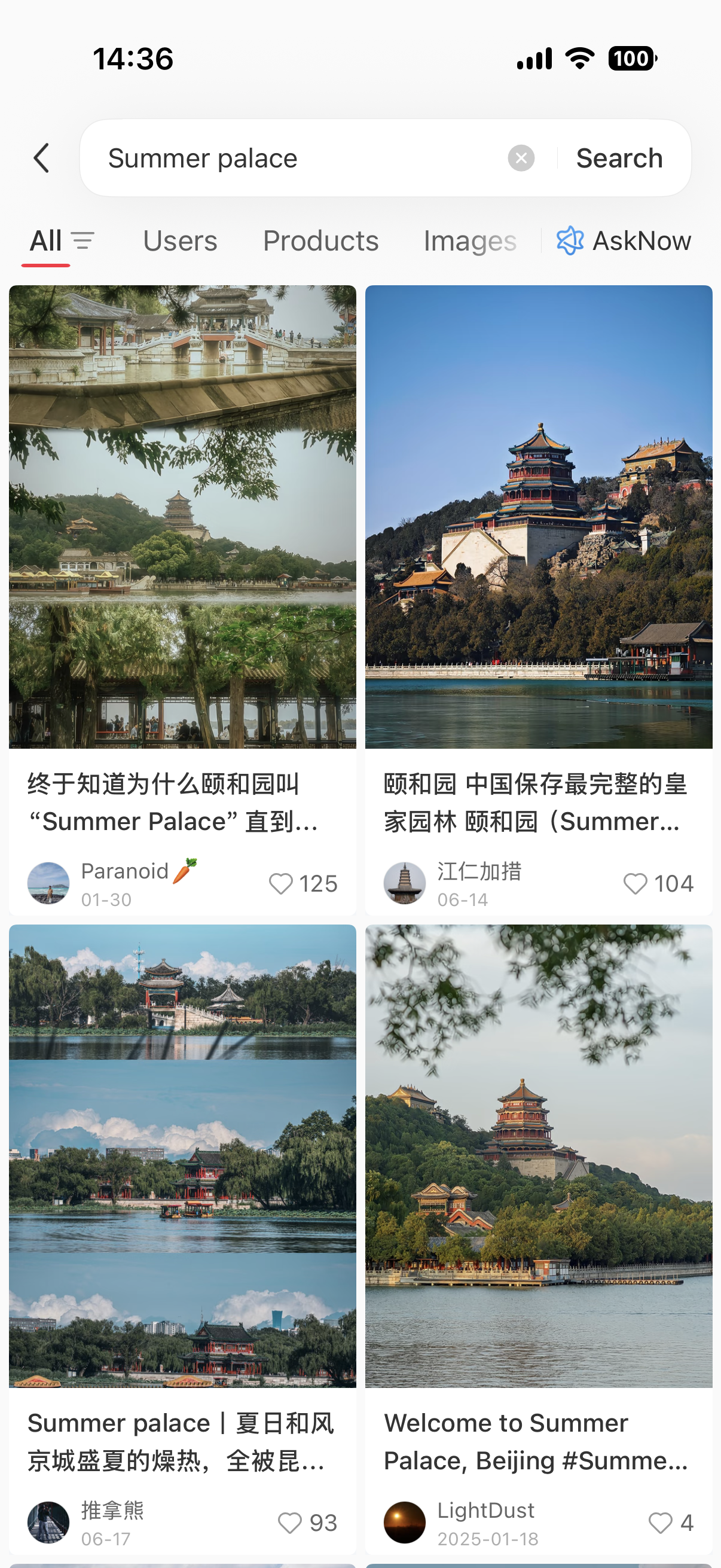
The English-query results grid is a mix — English post titles ("Summer palace | 夏日和风") sit next to Chinese post titles from the same feed. This is why English search is not "foreign users only."
One r/travelchina comment captures the friction:
"Don't you have to translate and search in Chinese every time to get the local content? When I search in English, I mostly get English results."
— r/travelchina · Is Trip.com "good enough" for China travel, or is Rednote a missing piece? · Feb 2026 🔗 Original thread
The fix is not "abandon English." It is knowing when to switch — English for browsing photos, Chinese the moment you need routes, hours, best entrances, recent reports.
A copyable keyword formula:
[place in Chinese] + [intent modifier] + [recency / trust modifier]
- Place in Chinese — copy from Amap, a translation app, or an existing post's location tag. e.g.
外滩,故宫,杭州西湖. - Intent modifier —
讲解(guided),路线(route),攻略(detailed guide),入口(entrance),咖啡馆(café),小众(niche),citywalk. - Recency / trust modifier —
2026,最新(latest),避雷(red flags — see §5).
Working examples: 外滩 citywalk 路线, 成都 火锅 避雷, 西安 兵马俑 攻略 2026.
Even repeat visitors run into this question:
"Like, is there something specific to search for on XHU to get the results I want?"
— r/travelchina · Help! Ways to find authentic/unique experiences and places in China, avoiding tourist traps? · Apr 2026 🔗 Original thread
The formula above is the answer.
Full translation and Ask dots — two reading layers, one verification rule
Two ways to read a post without knowing Chinese. Both work; neither replaces §4's verification step.
Layer 1 — Full-post translation. Turn on automatic translation in settings; the post's title, body, location tag, edit date, and comments render in English inline. Quality is high enough for practical reading — a paragraph about the Summer Palace's Qing-dynasty history reads as coherent prose, bullet lists stay lists. The limitation is scope, not quality: translation does not identify the correct Amap entity, confirm the venue is still trading, or check whether the photos match today's building.
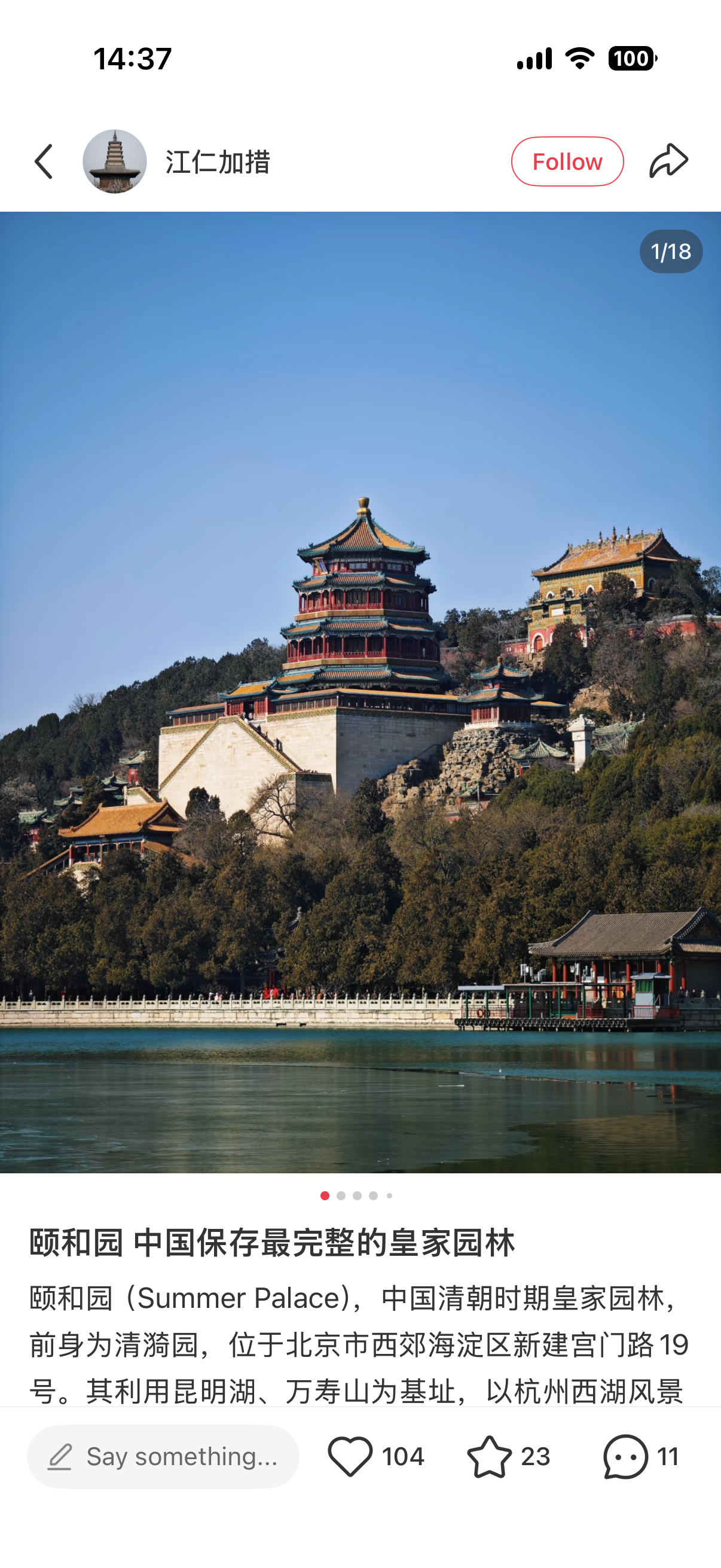
Original — a Chinese-language post about 颐和园 (the Summer Palace) as it appears without translation.
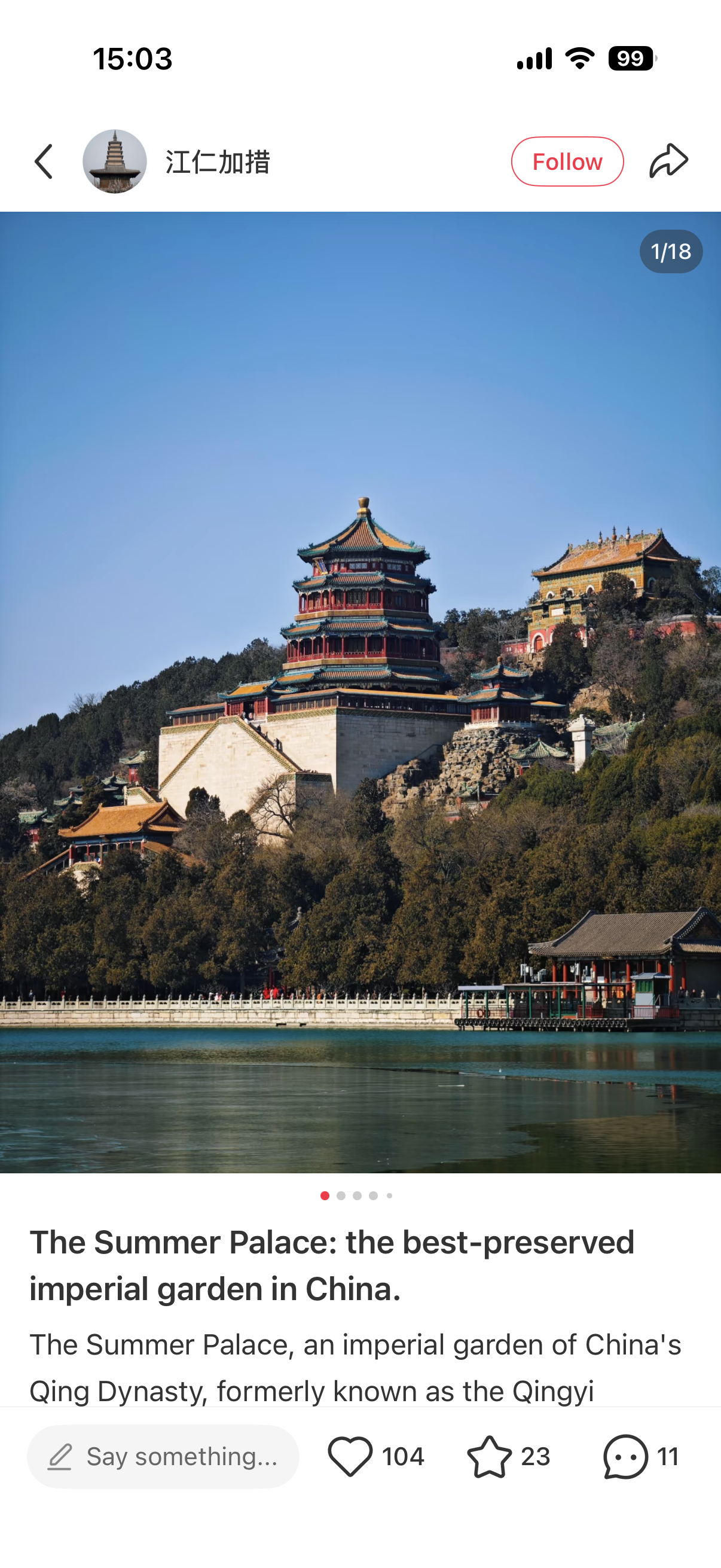
Same post, automatic translation on — the title becomes "The Summer Palace: the best-preserved imperial garden in China," and the body reads as coherent English prose, not machine soup.
Layer 2 — Ask dots (点点). From an open post, tap Share → Ask dots (leftmost option one row below WeChat / Moments / Weibo). The post is passed into RedNote's in-app AI assistant; you can ask, in English, for a summary or a follow-up. The response comes back as a structured English summary — often headlined and bulleted.
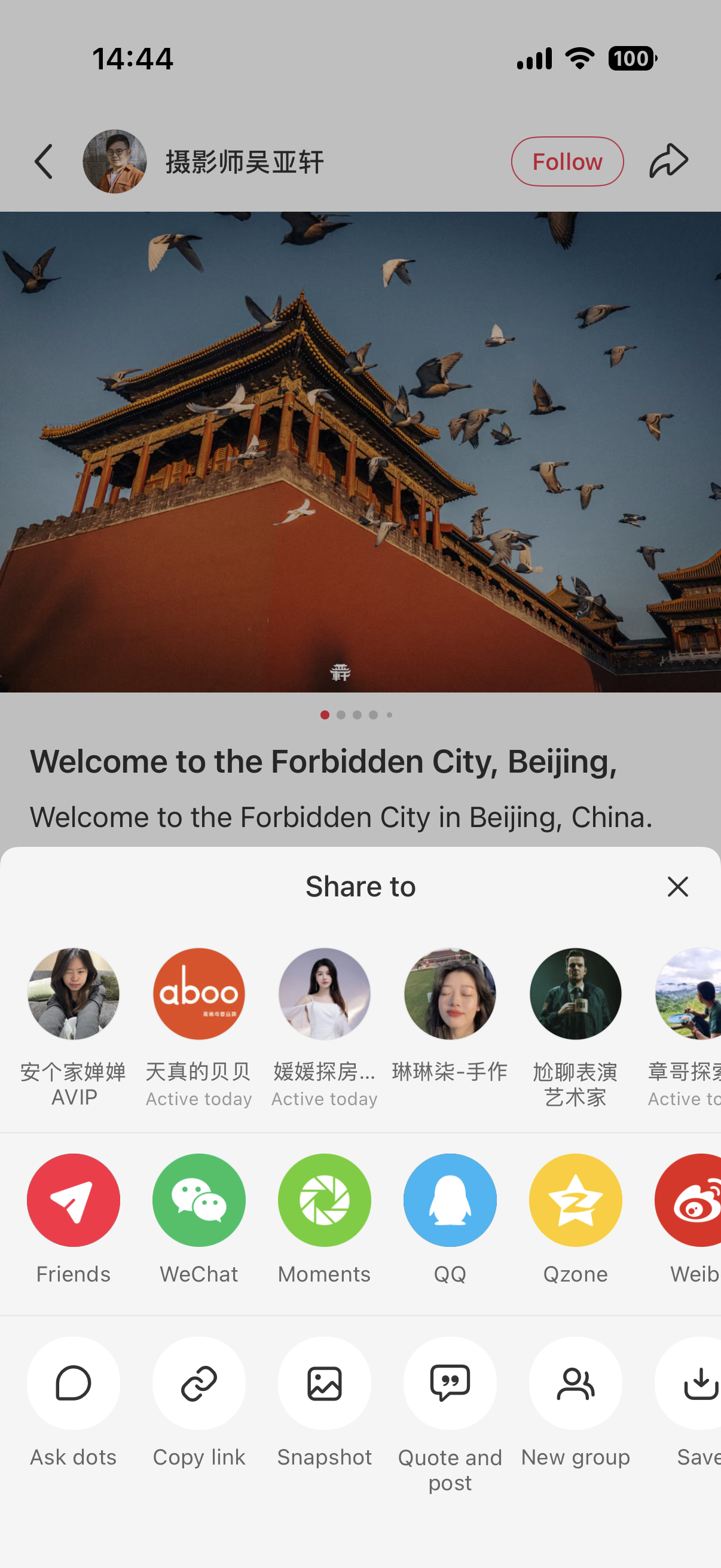
Share sheet — Ask dots is the leftmost action in the second row, below the standard social-sharing icons.
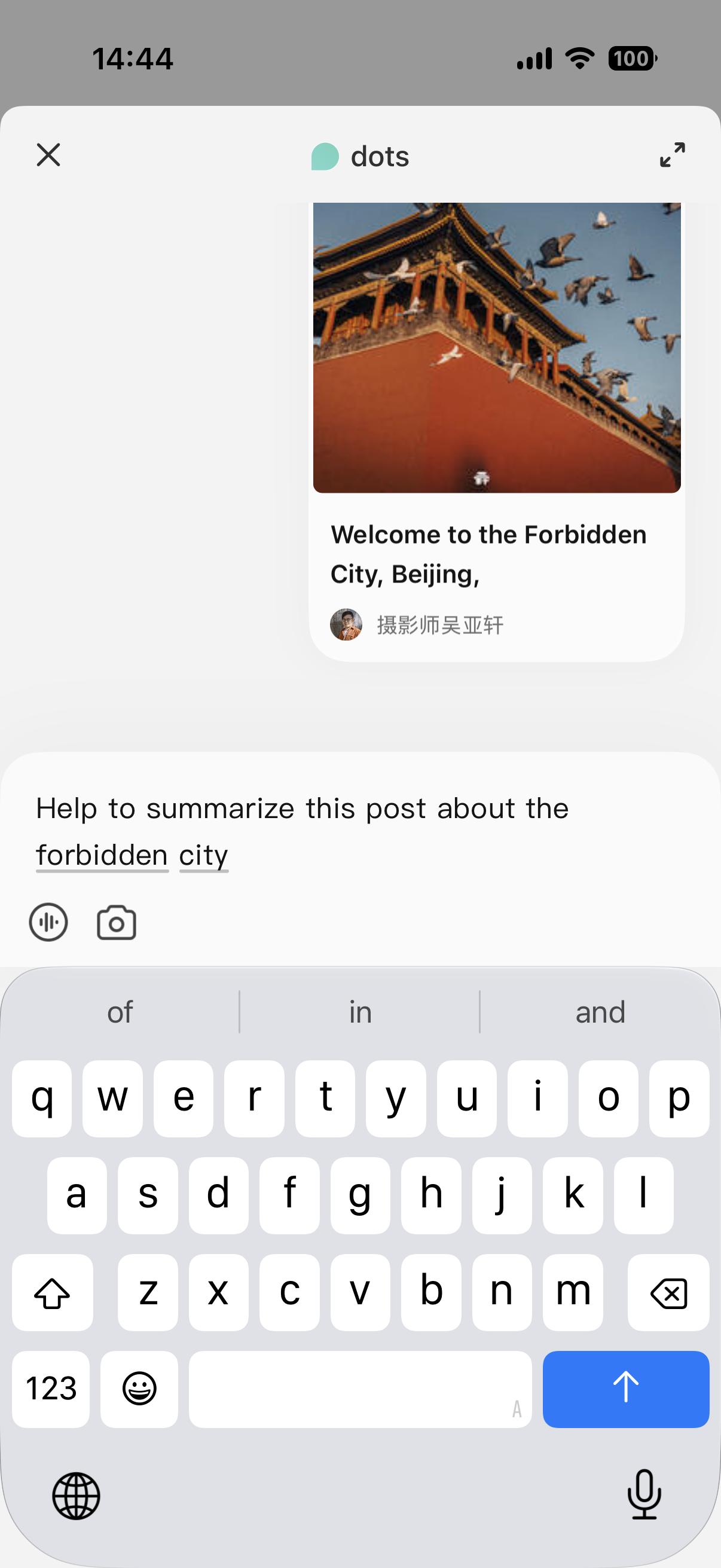
Ask dots opens with the shared post pinned at the top and an English prompt field — you can ask for a summary or a follow-up question in your own language.
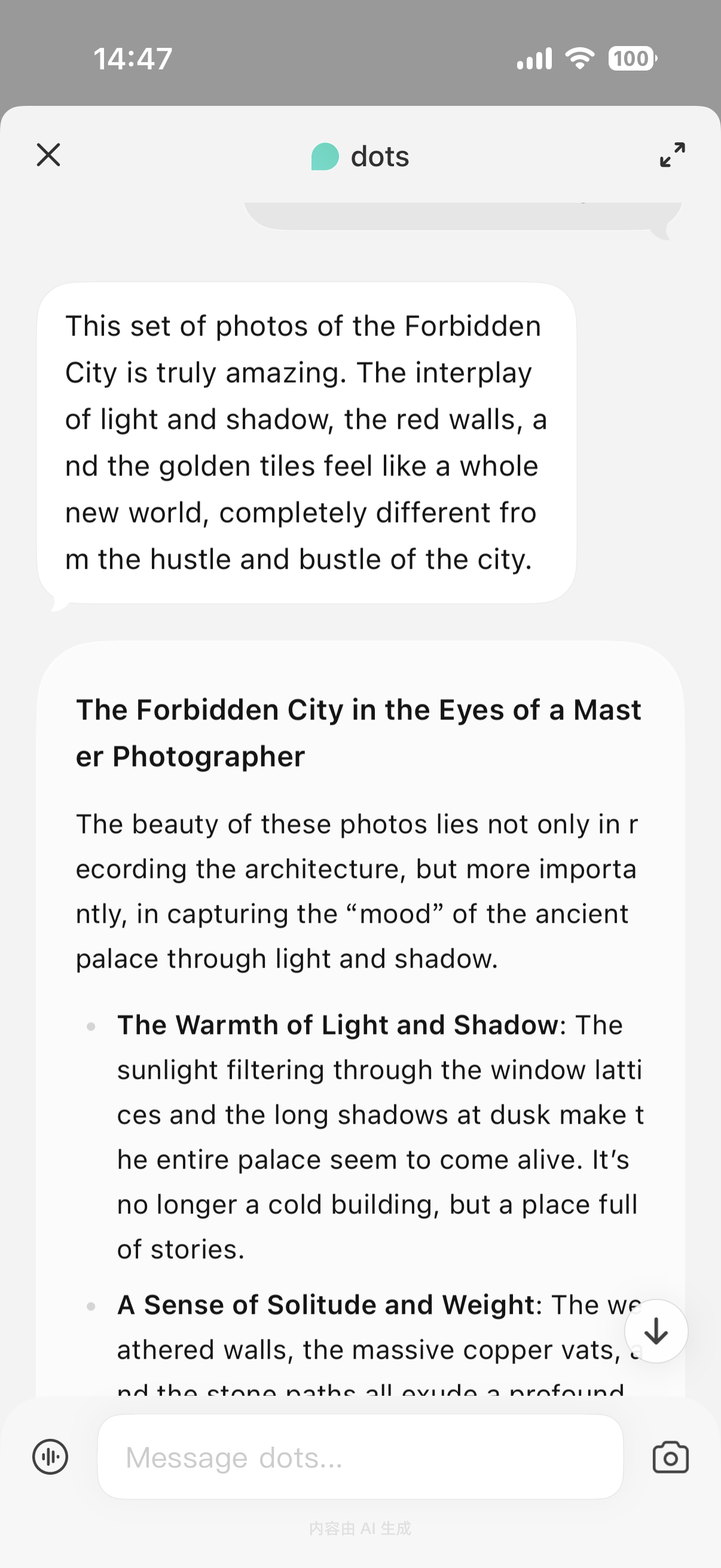
The dots response — structured English summary, often headlined and bulleted. Note the AI-generated content marker at the bottom of the pane.
Two things to notice: it is explicitly AI-generated (内容由 AI 生成 at the bottom of the pane — treat it like ChatGPT summarizing a webpage), and it does not create a route, add the place to Amap, book a ticket, or verify any fact. Verification and the Amap handoff are still on you.
The rule for both layers: whatever a translation or AI summary tells you, treat the post itself as one voice — honest, out-of-date, sponsored, or filtered. §5 is the filter.
For the translation stack outside RedNote — menus, signs, machine buttons — see Best Translation Apps for China 2026.
The note-to-Amap workflow
RedNote finds the place. Amap gets you there. In 2026 there is no one-tap "Send to Amap" from a Xiaohongshu note — this handoff is manual, about thirty seconds per stop.
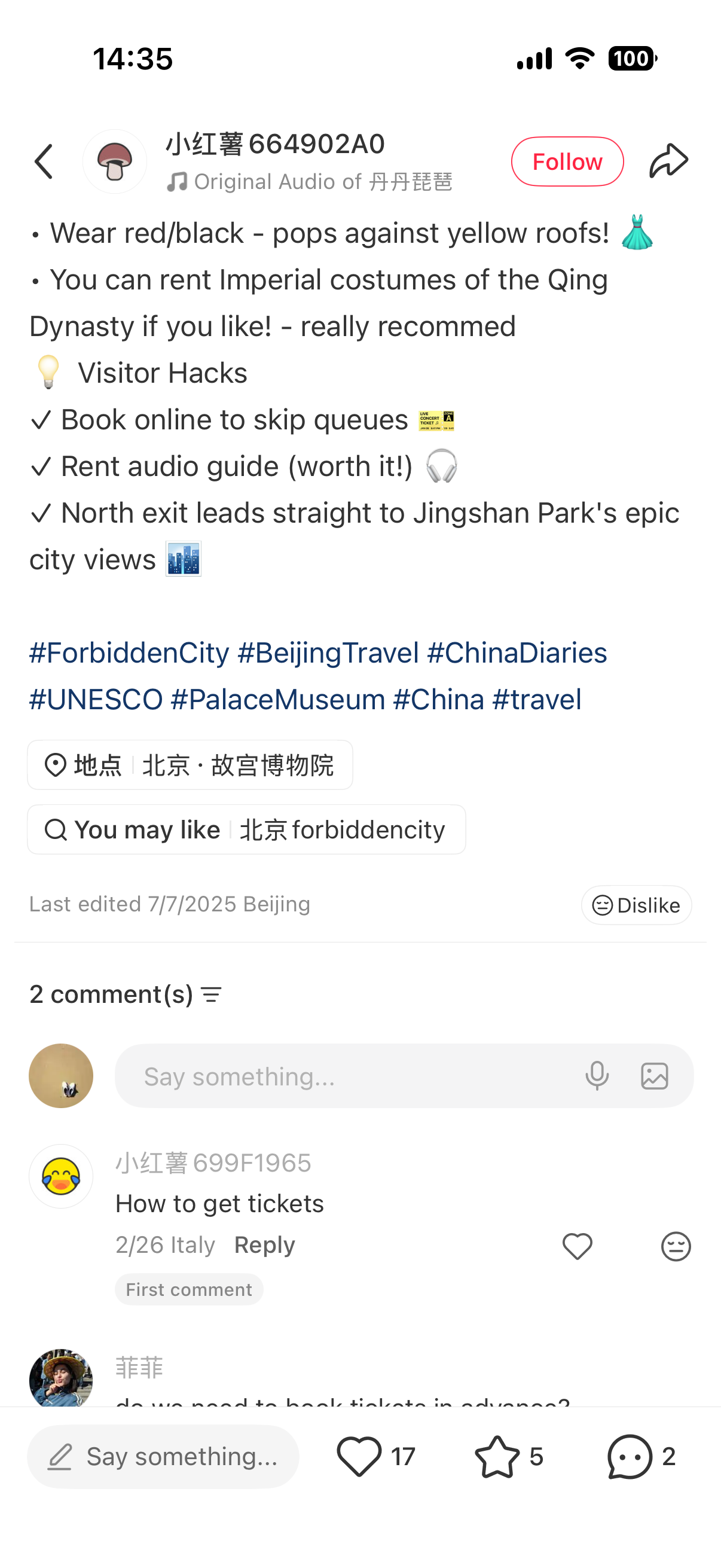
A translated Forbidden City post — the location tag 地点 北京 · 故宫博物院 and the "Last edited 7/7/2025 Beijing" line are exactly what you'll copy and check in step 1 below.
- Copy the Chinese name from the location tag, not the translated one. Most posts show a
地点 [City] · [Venue name in Chinese]line — e.g.地点 北京 · 故宫博物院. Tap-and-hold to select. If there is no location tag, copy the Chinese venue name from the body. - Paste into Amap. On iPhone, Apple Maps in mainland China runs on Amap data, so Apple Maps works too.
- Confirm the entity. Address, neighborhood, category, and — where shown — hours, phone, review count. Compare Amap's venue photos to the XHS post: same place, same building, old sign vs new sign?
- Save to your Amap list. Star it or add to a named list ("Beijing food," "Shanghai citywalk"). Your itinerary builds up as a real map, not a screenshot roll.
- (Optional) Google Maps as a secondary identity cross-check — English-language label only. Do not use Google Maps to navigate inside mainland China. Amap is where the routing lives.
Preserving the Chinese name is the whole game. Translated names ("Forbidden City," "Grandma's Restaurant") collide with multiple entities in Amap or map to the wrong branch. Chinese name plus neighborhood is unambiguous.
For citywalks — where this handoff is the whole point — see Shanghai Citywalk Routes and Beijing Hutong Walking Routes.
The trust filter — how to tell a real recommendation from styled marketing
The core RedNote warning is not new:
"Rednote is great for finding local restaurant and drink recs but heads up some posts are sponsored by the businesses so use your judgment."
— r/chinatravel · Just got back from China, here are some tips · May 2026 · 👍~73 🔗 Original thread
The positive adoption and the trust warning appear in the same sentence — that is the platform. Below is the filter.
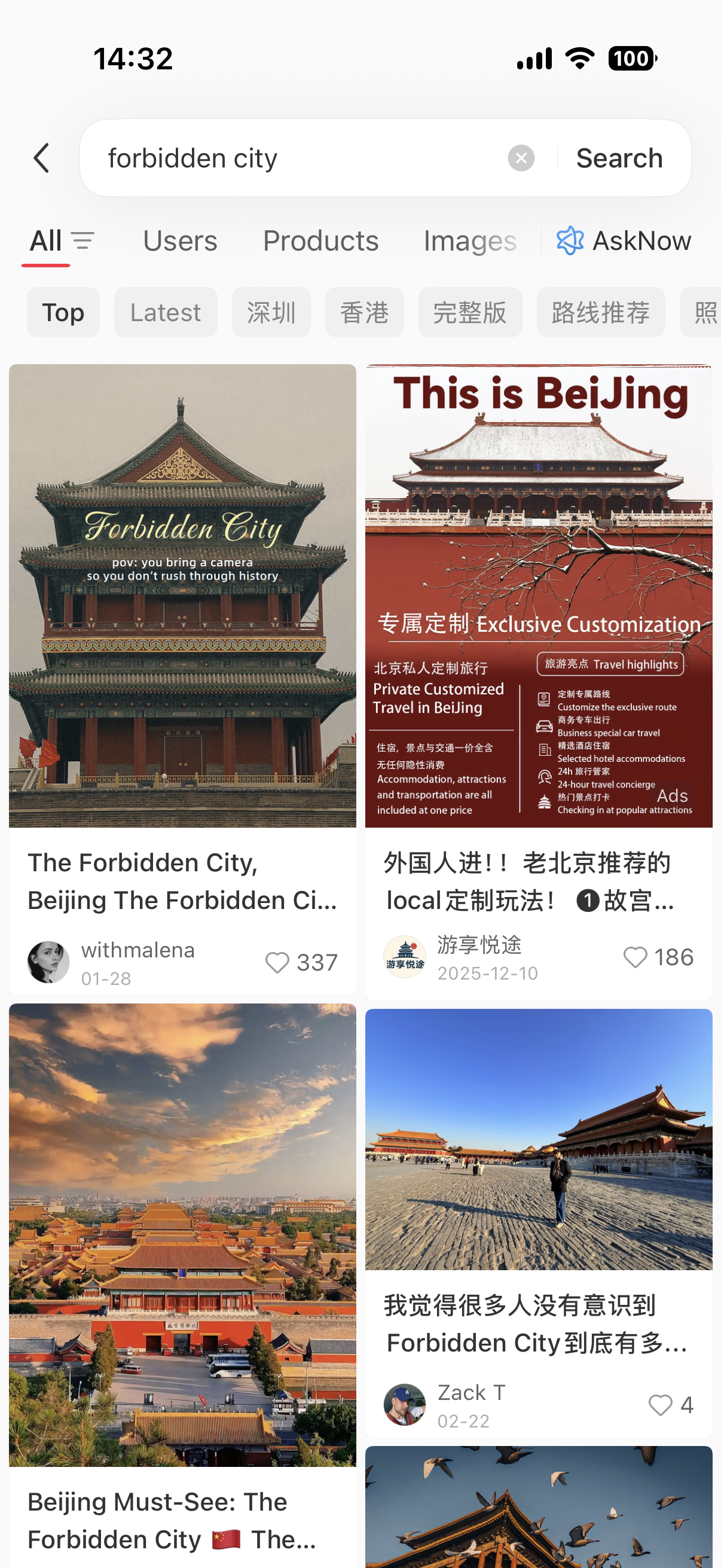
Formal paid placement in a search-results grid — the "This is BeiJing · Private Customized Travel" card is a sales unit sitting next to organic user posts. This is what item 1 in the filter below catches.
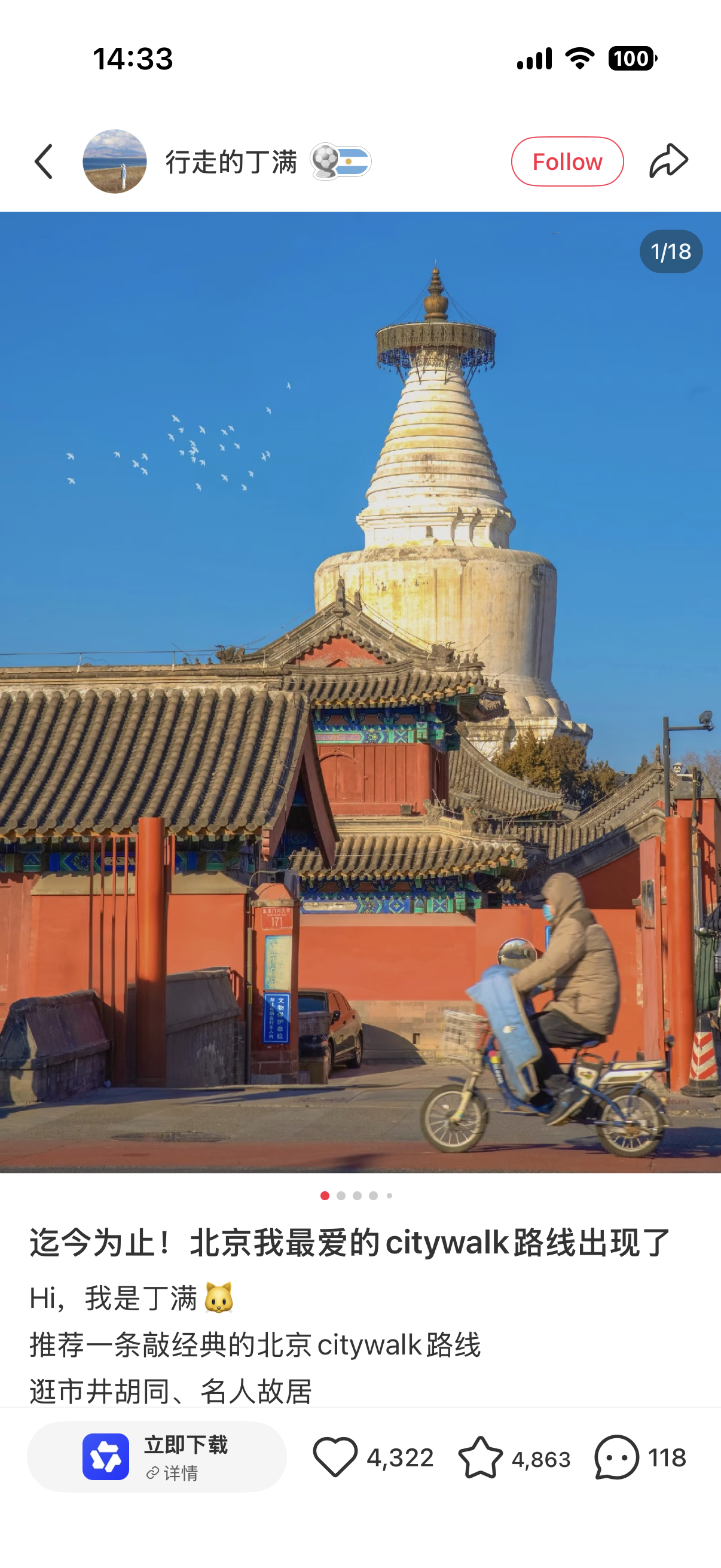
Sponsored CTA overlay on a promoted post — the 立即下载 / 详情 bar pinned to the bottom is the second signature of a formal placement.
Ads label + CTA card
Formal paid placements can carry an explicit Ads label in the search grid and/or a special action card pinned to the post — most commonly 立即下载 (Download now) or 详情 (Details). Easy to spot. Skip or heavily discount.
Not every commercial post is labeled. Free stays, gifts, affiliate arrangements, and small-scale creator promotion often look identical to a normal enthusiast note; the Ads tag catches formal placements only. Assume any glowing single-source rave might be quietly incentivized until other posts and comments corroborate it.
Xiaohongshu is a filtered-photo culture — assume every image has been color-graded. The published or last-edited date is a freshness clue, not proof; some creators re-publish old material. Prefer current-season posts. For construction, closures, or seasonal blooms, look for two or three matching recent posts, not one.
The comment thread is where expectations get corrected — the shop closed early, the line was two hours, the "hidden" café is on every tour route, the photo does not match today's building. Read top comments before planning around a note. On popular posts they are more useful than the note itself.
避雷 — the negative search
Instead of only searching for what to see, search for what to avoid. Add 避雷 ("avoid the lightning") to any query — 成都 火锅 避雷, 丽江 客栈 避雷 — and you get the posts specifically written to warn visitors off traps and tourist ripoffs. A locally legible tactic most English guides never mention.
If a place is worth going to, three unrelated posts will say so in different words. If only one viral note is raving and everything else is silent or negative, that is a signal. Never plan a half-day around a single post, no matter how many hearts it has.
On item 5, the tactic has been endorsed in the wild:
"There are many misleading photos on Rednote, so I suggest searching for attractions or foods you're interested in on the platform and adding keywords like '避雷 (red flags)'..."
— r/travelchina · Is Trip.com "good enough" for China travel, or is Rednote a missing piece? · Feb 2026 🔗 Original thread
A traveler in the same thread as §2's repeat-visitor question put it bluntly: "Xiaohongshu is flooded with ads, and even locals struggle to tell them apart." Combine 避雷 search with the §4 Amap handoff and you have most of what separates a good XHS-planned day from a wasted afternoon.
Privacy, and the pre-trip checklist
RedNote's App Store privacy disclosure lists possible collection of identifiers, precise location, contacts, user content, search history, and purchases — broadly in line with other consumer social apps, but worth taking seriously for a trip-length login.
Practical hygiene: precise location on only when searching nearby, off otherwise; contacts access not needed; don't post your hotel while staying there; a read-only pattern is a valid use; log out at home if you don't plan to use the app between trips.
Pre-trip checklist:
- [ ] Install RedNote / Xiaohongshu at home; confirm the app opens, translation works, and Ask dots is reachable from the share sheet
- [ ] Turn on automatic translation in settings; open one Chinese post to confirm the whole post renders in English
- [ ] Save a starter query set — city + intent modifier +
避雷combos for the two or three neighborhoods you'll spend the most time in - [ ] Confirm Amap is installed (or Apple Maps on iPhone) and you know how to paste Chinese into its search bar
- [ ] Do not rely on RedNote alone for bookings, opening hours, or transport — cross-check with Trip.com, 12306, or the venue's official account
Search in Chinese. Read with translation or dots. Verify the place. Navigate in Amap.
RedNote is a discovery and reading layer, not a booking or navigation layer. Use it for what Trip.com and Amap don't — local food, cafés, photo spots, citywalks, niche shops. Search in Chinese with a real intent modifier. Read the full post via translation, or send it to Ask dots for an AI summary — reading aids, not sources of truth. Preserve the Chinese venue name and hand it off to Amap. Apply the six-step trust filter before you build an afternoon around any single note.
Further Reading
- Essential Apps for China 2026 — where RedNote sits in the wider six-app foreigner stack
- Best Translation Apps for China 2026 — the built-in-first translation stack for everything outside RedNote
- China Maps & Navigation 2026 — why Amap (or Apple Maps on iPhone) is the mainland navigation layer, not Google Maps
- Attraction Tickets in China 2026 — the platforms that actually sell you the ticket after RedNote helps you decide where to go
- Shanghai Citywalk Routes and Beijing Hutong Walking Routes — routes designed for exactly the "RedNote inspiration → real map" handoff
👉 Get the complete China prep system: Complete China Guide ($19) → — payments, connectivity, navigation, high-speed rail, visa buckets, translation stack, and pre-trip checklists in one document. Twenty-five deep guides, including this one.
Research Coverage
- Primary communities: r/chinatravel and r/travelchina — five threads verified at the visible OP-and-comments level for adoption, sponsored-content warning, English/Chinese friction,
避雷tactic, and repeat-visitor search question - Reddit cards used verbatim: 5 — Just got back from China, here are some tips (May 2026, sponsored-post warning); Just got back from China and sharing a few tips as a person who worries (Apr 2026, food discovery adoption); Is Trip.com "good enough" for China travel, or is Rednote a missing piece? (Feb 2026, search-language friction); same thread (
避雷negative-search tactic); Help! Ways to find authentic/unique experiences and places in China (Apr 2026, repeat-visitor "what do I search") - Excluded evidence: self-promotional product-validation threads; unverified "3-star filter" advice; Google Trends data (Explore API blocked on 2026-06-30, no rising-query claims made)
- App verification: Nate mobile QA on iPhone with an overseas account, 2026-07-01 — confirmed English/Chinese starting-suggestion divergence for
故宫vsforbidden city, mixed EN/CN result grid on English queries, coherent full-post translation, visibleAdslabel +立即下载 / 详情CTA overlay on formal paid placements, share sheet Ask dots entry, dots English AI-generated summary output labeled内容由 AI 生成 - Competitor scan: Go2China, Travel of China, Bellingcat, China Travel Pack — none focused on the verify → Amap workflow this article owns
- Research conducted by: Codex (Reddit + platform verification), 2026-06-30; app QA by Nate, 2026-07-01
Tags: xiaohongshu for foreigners, rednote china travel, how to use xiaohongshu, xiaohongshu english travel guide, rednote food discovery china, xiaohongshu search formula, xiaohongshu 避雷 tactic, xhs to amap workflow, rednote ask dots ai